wissel.net

Usability - Productivity - Business - The web - Singapore & Twins

By Date: December 2018

Pattern in your Apex Controller


A (software) design pattern is a general, reusable solution to a commonly occurring problem withing a given context. Christoper Alexander inspired the Gang of four to apply pattern to software and enumerate 23 classic software pattern.

This article discusses how to use some of them in the context of Apex controllers.

The context: Same same, but different

You are creating an application to support construction on force.com that will serve multiple countries. Part of the requirements is to compute a risk score for any given project. While ISO standards form the foundation of the assessment, each jurisdiction has some specialties that alter the logic eventually.

This is just one of the requirements, you have many more that follow the pattern Same Same - But different.

Patterns used

Besides those, you want to know Apex Enterprise Patterns. Go Trailhead and learn

The details

The Apex controller isn't used to retrieve records, that's the job of the Lightning Data Service. It is however used for auxiliary information, like the computation of the risk score or check which part of your component should be rendered or or or. Most of the functionality is needed elsewhere too (like compute risk score in a trigger), so coding it into a @AuraEnabled static method doesn't make much sense.

Therefore the Apex controller is implemented as a Facade. No actual logic is implemented, but execution is delegated to specific classes (sample below).

The controller shouldn't contain logic to pick the concrete class, since each new country you start business in would require a change to the controller. Picking the right class is left to a factory. A common approach for factories is to have a factory class with one factory method. You can design that class static or to be instantiated, depending on the amount of context your factory needs. In my case I used a static RiskAssessmentFactory class with a single static method RiskAssessor getRiskAssessor(String countryId) that would return....

An instance of an interface (e.g. RiskAssessor)! This is an important element of maintainability. A factory method should always return an (instance of an) interface. Not a base class or one specific class, but an interface. Returning a concrete class defeats the very purpose of the factory pattern, returning a base class limits the flexibility of your solution. Factory and Interface belong together like Stand and Ollie, Caesar and Cleopatra or peanut butter and jelly.

Repeat after me:

A factory method returns an instance of an interface

When you define your factory without interfaces, on each call a kitten must die and an unicorn cries.

Where does the metadata fit in?

Analyzing the business requirements, you notice that the rules are quite similar, just some of the factors are different. E.g. in one jurisdiction number of stories is multiplied by 1.2, in another by 1.5 and in another not considered (= multiplied by 0).

So you design a custom metadata object (don't make the mistake and use a custom object - it will only add headache to your sandbox testing) and create records for your countries, so the same class can cater for multiple jurisdictions. Your factory will read that meta data before instantiating a class that implements the RiskAssesor interface.

To maintain your flexibility, after all you suspect that the building code for Zamunda is vastly different, the metadata record contains a field CustomRiskClass. When that field isn't empty your factory will not instantiate the common base class, but use this class. Storing the class name in metadata allows you to keep your country specific implementations in their own package.

A country package would as a minimum contain the meta data record. If the need for a custom class arises, that class would be in the country package too.

A sample

Fair warning: that code is typed here, probably not ready for copy and paste.

public interface RiskAssessor {
 RiskAssessor setMetadata(CountryRiskConfig_mdt countryMetadata);
 int isoRisk(ProjectPlan__c theProject);
 String countryRiskLevel(ProjectPlan__c theProject);
 RiskResult(String projectPlanId);
}

public class RiskAssessmentFactory {
 static RiskAssessor getRiskAssessor(String countryId) {
  RiskAssessor result;
  CountryRiskConfig_mdt countryMetadata = getCountryMeta(countryId);
  if (countryMetadata.CustomRiskClass != null) {
   result = (RiskAssessor) Type.forName(countryMetadata.CustomRiskClass).newInstance();
  } else {
   result = new RiskAssessorDefault;
  }
  result.setMetadata(countryMetadata);
  return result;
 }
}

public virtual class RiskAssessorDefault implements RiskAssessor {
 // TODO: implement interfaces here
}

The RiskAssessorDefault class is defined using the virtual keyword, so you can subclass it as need arises. To be clear: the subclassing helps to avoid duplicate code, it doesn't break the need for interfaces.

As usual: YMMV


Posted by on 29 December 2018 | Comments (0) | categories: Apex Salesforce Software

Lightning Web Components (LWC) quick overview


On December 13 Salesforce announced Lightning Web Components (LWC) a new way to build components on the Salesforce platform. Here is my take.

Expanding Lightning Family

"Lightning" serves now as a family name for modern Salesforce development. LWC are the latest family members. We now have:

The linked blog entries explain the rationale, so check them out.

Same but different

The look and feel doesn't change, the way you code them does. For now SFDX, Visual Studio Code and the Salesforce Extension Pack are to goto tools for the Spring 2019 release.

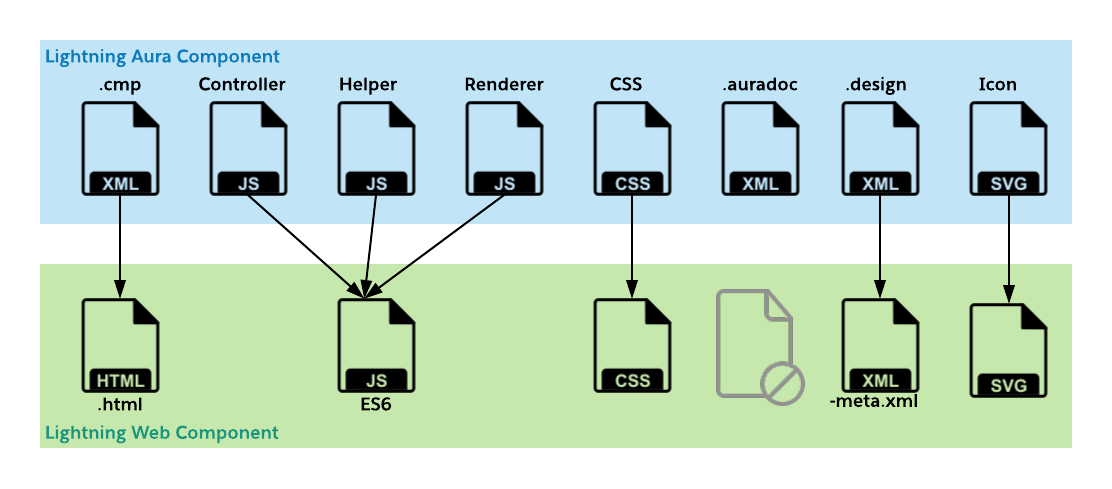
The new file structure 4 instead of 8 files

Instead of up to 8 files you only need 4. For one: all JavaScript (3 files) now lives in one ES6 JS file and we don't have an auradoc or svg file for now

Co-existence

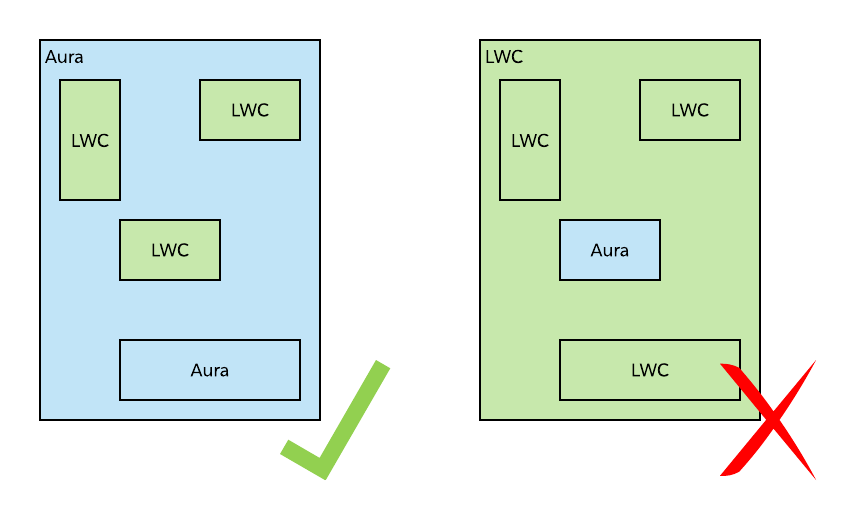
Existing Aura based components will continue to work and will even allow to contain LWC components.

LWC in Aura, but not Aura in LWC

What you can't do is putting Aura components inside LWC. So your transition to LWC is bottom-up, not top-down

Cha cha cha changes

There are lots of changes in syntax and structure. Here is what I found on first glance when comparing Aura and LWC:

  • <aura:attribute> -> @api
  • {!myAttribute} -> {myAttribute}
  • <aura:iteration...> -> for:each
  • <aura:if isTrue...> -> if:true / if:false as element attribute
  • <aura:component ...> -> <template>
  • {!v.facetName} -> <slot name="facetName">
  • <lightning:formattedText> -> <lightning-formatted-text> (colon and camelCase replaced by lowercase and dash)
  • .THIS .red {} -> .red {} CSS takes advantage of Shadow DOM encapsulation
  • <aura:handler name="init" ...> -> connectedCallback();
  • Expressions -> JavaScript (functions)
  • <aura:registerEvent ...> -> DOM Events
  • event.fire() -> this.dispatchEvent(...)
  • <aura:handler ...> -> addEventListener()

There will be more, stay tuned.

Goodby $A

$A is the global object of the Aura framework, it has no place in LWC. Instead of $A.enqueAction(...)you now simply import the@AuraEnabledfunction and use it as regular JS function. What is gone for good is$A.createComponents. Here you can use the render function to pick different predefined template (more on that in a future post).

Stay tuned for more!


Posted by on 14 December 2018 | Comments (0) | categories: Lightning Salesforce WebDevelopment

Salesforce login statistics aggregation


A recent requirement from a customer was "I'd like to analyze logins by users in Excel", despite a dashboard approach would be sufficient. With a few million records aggregating in Excel wasn't particularly appealing

Download the log

Salesforce setup allows to download the log as csv or csv.gz file. In any case you should use the later. I learned the hard way: the chunked transfer encoding might leave you with less data be processed than you expect.

The Scanner simply stopped after a few thousand entries, while the csv parser barfed with an error.

Processing

After downloading and extracting the csv I used a small Java routine (yep, I'm that old) to aggregate logins per user, capturing the count and the first/last login date as well as the country of login (with the disclaimer caveats) and the eventual community.

For reliably and robustly reading csv in Java, usually I would use a robust library, however in this case having no dependencies and using the scanner did just nicely

Two little details: to get the results I simply overwrote the toString() method, so the output generation is a one liner using an arrow function. Enjoy!

Class: Report.java

import java.io.File;
import java.io.FileOutputStream;
import java.io.IOException;
import java.io.OutputStream;
import java.io.PrintWriter;
import java.util.Map;
import java.util.Scanner;
import java.util.TreeMap;

/**
 * @author swissel
 *
 */
public class Report {

    /**
     * @param args
     * @throws IOException
     */
    public static void main(final String[] args) throws IOException {
        if (args.length < 2) {
           System.err.println("Use: java report CSVInputFile CSVOutoutFile");
           System.exit(1);
         }
        // From args[0]/[1]
        final String inFileName = args[0];
        final String outFileName = args[1];

        final File inFile = new File(inFileName);
        final File outFile = new File(outFileName);

        if (outFile.exists()) {
            outFile.delete();
        }
        final OutputStream out = new FileOutputStream(outFile);
        final Report r = new Report();
        r.run(inFile, out);
        out.close();
    }

    private void run(final File inFile, final OutputStream outStream) throws IOException {

        final Map<String, UserStat> allUsers = new TreeMap<>();
        int total = 0;
        final PrintWriter out = new PrintWriter(outStream);
        final Scanner s = new Scanner(inFile);
        s.nextLine(); // Skip the header
        while (s.hasNextLine()) {
            total++;
            final String line = s.nextLine();
            final String[] items = line.split(",");
            final String user = items[0];
            final String timeString = items[1];
            final String country = (items.length > 16) ? items[16] : "N/A";
            final String community = (items.length > 12) ? items[12] : "N/A";
            final UserStat curUser = (allUsers.containsKey(user)) ? allUsers.get(user) : new UserStat(user);
            curUser.addLogin(timeString, country, community);
            allUsers.put(user, curUser);
        }
        s.close();
        out.println("User,Country,Community,firstLogin,LastLogin,LoginCount");
        allUsers.entrySet().forEach(u -> out.println(u.getValue()));
        System.out.println(total);
    }
}

Class: UserStat.java

public class UserStat {

    private final String userName;
    private String country = "N/A";
    private String community = "N/A";
    private int loginCount;
    private String firstLogin = "";
    private String lastLogin = "";

    public UserStat(final String userName) {
        this.userName = userName;
    }

    public void addLogin(final String dateString, final String country, final String community) {
        String loginDateString = this.yearMonthDate(dateString);
        if (country != null && !country.equals("") && !country.equals("N/A")) {
            this.country = country;
        }
        if (community != null && !community.equals("") && !community.equals("N/A")) {
            this.community = community;
        }
        this.loginCount++;
        if (loginDateString.compareTo(this.lastLogin) > 0) {
            this.lastLogin = loginDateString;
        }

        if (this.firstLogin.equals("") || this.firstLogin.compareTo(loginDateString) > 0) {
            this.firstLogin = loginDateString;
        }
    }

    @Override
    public String toString() {
        return this.userName+","+this.country+","+this.community+","+this.firstLogin+","+this.lastLogin+","+String.valueOf(this.loginCount);
    }

    // Reformats date string Singapore format DD/MM/YYYY into YYYY-MM-DD
    private String yearMonthDate(final String incoming) {
        return incoming.substring(7, 11)+"-"+incoming.substring(4, 6)+"-"+incoming.substring(1, 3);
    }

}

Take the result, open it in the spreadsheet of your choice and make shiny graphs!

As usual YMMV!


Posted by on 05 December 2018 | Comments (0) | categories: Java Salesforce